Description
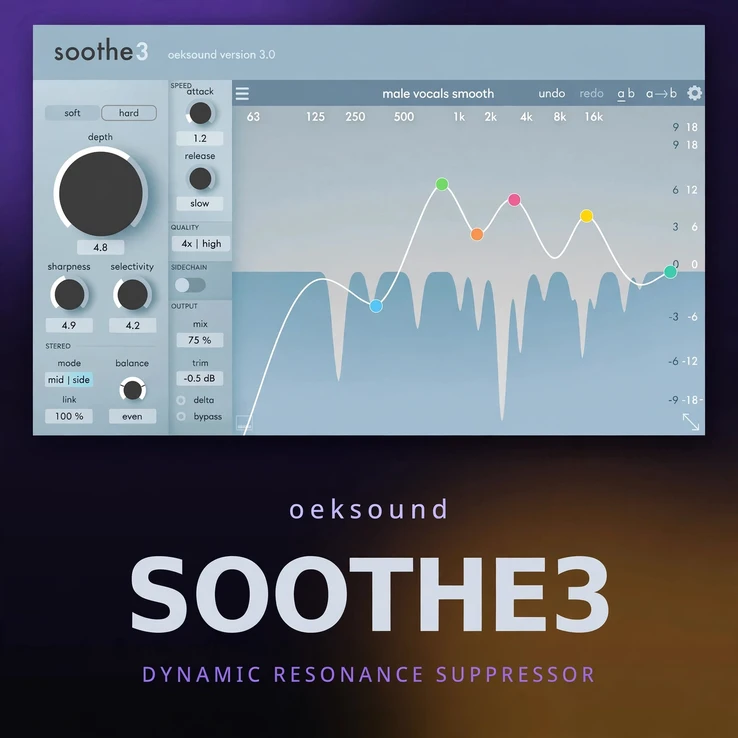
oeksound soothe3 mac is the next step in resonance control for Mac producers, mixers and mastering engineers. Where a static EQ cuts the same frequencies all the time, oeksound soothe3 mac listens to your audio as it plays, finds the resonances that flare up only in certain moments, and reduces just those — only when they appear. The result is a vocal that stays present without biting, a guitar that stays bright without ringing, and a full mix that stays open without harshness building up. It works fast, sounds transparent, and fits straight into a modern macOS session.
Harshness is rarely constant. A singer moves closer to the microphone, a synth patch hits a bright note, or a room reflection joins the mix for a second — and suddenly a narrow band of frequencies jumps out. A traditional EQ would tame that band for the whole track, taking life out of the good parts too. oeksound soothe3 mac takes a smarter route: it tracks the spectrum in real time and applies dynamic, frequency-specific reduction exactly where and when it is needed, leaving the rest of the signal untouched.
Contents
- What oeksound soothe3 mac does differently
- Soft and Hard modes
- Low-latency tracking for recording and live work
- Multichannel support up to 9.1.6
- The Detail knob
- System requirements and compatibility for Mac
- Key features
- Why mixers choose oeksound soothe3 mac
- Frequently asked questions
What oeksound soothe3 mac does differently
The heart of oeksound soothe3 mac is its intelligent resonance detection. The plugin analyses the incoming signal continuously and builds a picture of which frequencies are resonating too strongly. When a resonance crosses the threshold you set, soothe3 pulls it back smoothly and lets it return just as smoothly when it passes. Because the reduction follows the audio, you do not get the pumping, dulling or phase artefacts that come from heavy static EQ cuts.
That makes it useful far beyond one job. Use it on a vocal to soften sibilance and nasal peaks, on an acoustic guitar to calm string ring, on a snare to remove boxiness, on a synth to tame a piercing top end, or across a whole mix bus to keep harshness under control while the track stays lively. You set how much reduction is allowed, how sharp the detection is, and how the plugin reacts — soothe3 does the moment-to-moment work.
Soft and Hard modes
oeksound soothe3 mac gives you two distinct characters for resonance control. Soft mode is the gentle, transparent option: it smooths out harshness with a light touch, ideal for vocals, acoustic instruments and full mixes where you want the correction to disappear. It is the mode to reach for in mastering, or whenever the track already sounds close and just needs a little polish.
Hard mode is firmer and more assertive. It digs deeper into stubborn resonances and holds them down more decisively, which suits aggressive synth sounds, distorted guitars, harsh drum overheads and dense mixes where a softer touch would be lost. Switching between the two modes is instant, so you can compare them on the same passage and pick the character that serves the song. Both modes stay musical — the aim is always to remove the irritation, not the instrument.
Low-latency tracking for recording and live work
Resonance tools are most useful when you can hear them while you work, and oeksound soothe3 mac is built for that. Its low-latency tracking mode is designed for recording, monitoring and live use, keeping delay low enough to track a vocal or instrument through the plugin without the distracting lag that makes a take feel wrong. You can shape the sound as the artist performs, catch harshness at the source, and commit to a cleaner recording from the start.
In the mix, the same low-latency design keeps large sessions responsive. Insert soothe3 across many tracks without the session dragging, and adjust detection, depth and mode while the music plays. The interface shows you exactly what is being reduced and where, so every move you make is a decision you can hear and see.
Multichannel support up to 9.1.6
Modern mixes are not always stereo, and soothe3 is ready for more. oeksound soothe3 mac supports multichannel formats up to 9.1.6, so the same transparent resonance control works in immersive and surround sessions as well as in a two-channel mix. Whether you are preparing a Dolby Atmos mix, a film score or a surround sound design, you can tame harshness across the whole soundfield with one consistent tool instead of patching together different processors for different channels.
For stereo and mono sources, nothing changes: the workflow is identical, the controls are the same, and the sound stays just as clean. That consistency matters when a project moves from a stereo mix to an immersive version — your resonance settings and your ears translate directly.
The Detail knob
New in oeksound soothe3 mac is the Detail knob, and it changes how the plugin reads your audio. Turn it one way and soothe3 focuses on the broad, obvious resonances that dominate a track. Turn it the other way and it zooms in on finer, more subtle details in the spectrum, catching small peaks that a broader view would miss.
Used carefully, Detail lets you choose between a smooth, forgiving result and a precise, surgical one. On a vocal, a finer setting can pick out a single ringing note in a phrase; on a full mix, a broader setting keeps the overall tone even without chasing every tiny peak. It is a simple control with a real effect on the sound, and it is one of the quickest ways to make soothe3 fit a particular source.
System requirements and compatibility for Mac
This is the Mac-only edition of soothe3, built for Apple computers. It runs on macOS 10.14 Mojave through macOS 27, covering both Intel Macs and Apple Silicon Macs natively, so it performs well on a current M-series machine and still works on an older Intel system. It is supplied as VST3, AU and AAX, so it loads in Logic Pro, Pro Tools, Ableton Live, Cubase, Studio One, FL Studio and other major Mac DAWs that support those formats.
An iLok account is required for activation, and the plugin is authorised through iLok — please have your iLok account ready before you install. No extra hardware is needed beyond your Mac and your DAW. For the official details, see the oeksound soothe3 page.
Key features
Here is a quick summary of what oeksound soothe3 mac offers in a Mac session.
- Dynamic resonance suppression that follows the audio in real time
- Soft and Hard modes for transparent or assertive correction
- Low-latency tracking mode for recording, monitoring and live work
- Multichannel support up to 9.1.6 for immersive and surround mixes
- New Detail knob to choose broad or fine resonance detection
- Mac-only edition: macOS 10.14 to macOS 27, Intel and Apple Silicon
- VST3, AU and AAX formats for all major Mac DAWs
- Clear visual display showing exactly what is being reduced and where
- iLok activation required
Why mixers choose oeksound soothe3 mac
Good mixes are not made by removing character — they are made by removing the things that distract from it. If you are coming from soothe2, see the earlier generation at oeksound soothe2 on MixmasterPlugins; soothe3 keeps that same transparent idea and adds more control, more speed and more formats. It does the tedious frequency-hunting for you, so you can spend your time on balance, tone and feel instead of chasing a ringing note with a narrow EQ band.
Whether the job is a single vocal, a dense rock mix or a full immersive session, oeksound soothe3 mac gives you a fast, honest way to keep harshness in check — and to keep the music sounding like itself.
Frequently asked questions
Is this the Mac-only version?
Yes. This listing is for macOS only, running on macOS 10.14 through macOS 27 on Intel and Apple Silicon Macs, in VST3, AU and AAX formats.
Do I need an iLok?
Yes, an iLok account is required to activate soothe3. Authorisation is handled through iLok, so set up your account before installing.
What is the difference between Soft and Hard mode?
Soft mode is a gentle, transparent correction for vocals, acoustic sources and full mixes. Hard mode is firmer and more assertive, for stubborn resonances in aggressive sounds and dense mixes.
Can I use it while recording?
Yes. The low-latency tracking mode is designed for recording and monitoring, so you can track through the plugin without distracting delay.
Does it work on a full mix?
Yes. oeksound soothe3 mac works on single tracks, groups and the mix bus, and supports multichannel formats up to 9.1.6 for immersive sessions.



Reviews
There are no reviews yet.