Description
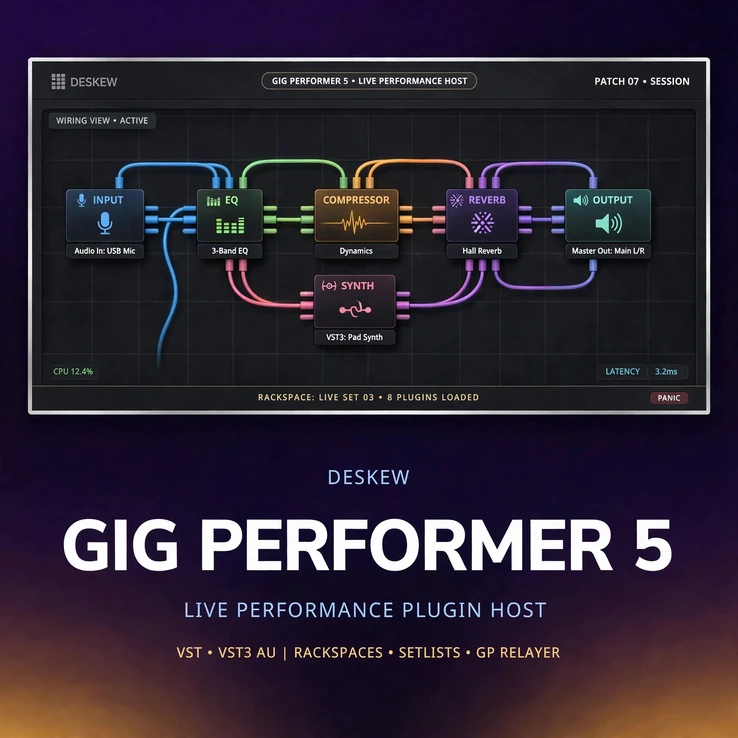
Deskew Gig Performer 5 Pro is built for one moment: the moment you walk on stage. It is a live performance audio plugin host that runs your virtual instruments and effects from a laptop, with the reliability, speed and simplicity that live work demands. While studio software asks you to manage recording and mixing, Deskew Gig Performer 5 asks only what the show needs: which sound, which song, which part, right now.
Everything in Deskew Gig Performer 5 serves that moment. Sounds are built visually, by wiring plugins together. Shows are organised as songs, song parts and setlists. Controls are custom panels mapped to your own MIDI controller. And switching is instant, so the music never stops between sounds.
Visual wiring, instant switching
The wiring view replaces the channel strip. Plugins are blocks, connections are cables, and the entire signal flow is visible at once. Connect an instrument to an effect, split a keyboard across two synths, or blend a hardware synth with a software one, all by dragging wires.
Rackspaces save each complete sound, variations save alternate settings within it, and switching between rackspaces happens instantly with no audio dropouts, while reverb tails and held notes ring out. Predictive loading keeps large gig files light on RAM and fast to open, and the Wiring Activity view in version 5 shows your cables lighting up as you play, with levels in green, yellow and red, so the rig can be checked at a glance.
What is new in version 5
Deskew Gig Performer 5 adds GP Relayer, a plugin that moves audio and MIDI between the host and your DAW in real time, for recording shows or using DAW-only plugins on stage. The MIDI Rechannelizer reroutes MIDI channels with a grid interface, the MIDI Chord Maker builds full chords from single notes, and the Envelope Follower lets audio volume shape envelope parameters in real time, ideal for wah-wah guitar work.
The Streaming Audio File Player gains Stretch and Transpose for backing tracks, Global Rackspace MIDI centralises MIDI processing, the MIDI Transposer shifts notes and aftertouch along a wiring path, and Song Part Actions automate widget changes, program changes and OSC messages whenever a song part is selected. GPScript remains available for anything beyond the standard toolset.
Your rig, your controls, any stage
Front panels turn Deskew Gig Performer 5 into your own instrument. Build a control surface from widgets, knobs, faders, buttons and meters, map it to your controller, and the controls that matter are always visible, without opening a single plugin window.
The Global Rackspace shares effects, splits and transpositions across every sound in the gig, and the Rig Manager saves hardware mappings so the rig can be remapped to venue backline in a few clicks. Hardware and software stay in sync in one environment, and gig files transfer between Mac and Windows when the same plugins are installed.
Do you need an audio interface?
Deskew highly recommends an external audio interface for Deskew Gig Performer 5. Internal sound cards may work, but they are not supported, and a proper interface gives you the low latency and reliable inputs and outputs a live show needs. For the computer itself, Deskew Gig Performer 5 needs macOS 10.9 Mavericks or later on Intel, or macOS 10.14 Mojave to 27.x Golden Gate with the Universal build for Intel and Apple Silicon.
On Windows, Windows 7 (SP1) or later, 64-bit, is required. Allow a minimum of 8 GB of RAM, with more recommended for plugin-heavy rigs. GP Relayer on Mac needs macOS 10.14 or newer. Deskew Gig Performer 5 hosts VST, VST3 and AU plugins, with AU on macOS only, and your licence key allows up to 5 activations on each operating system your purchase covers.
Frequently asked questions about Deskew Gig Performer 5
What is new in Deskew Gig Performer 5? GP Relayer, the Wiring Activity view, MIDI Rechannelizer, MIDI Chord Maker, Envelope Follower, Stretch and Transpose in the Audio File Player, Global Rackspace MIDI, MIDI Transposer and Song Part Actions.
Will my plugins work with it? Deskew Gig Performer 5 is designed to work with all VST, VST3 and AU plugins. AU plugins are supported on macOS only.
Do I need an audio interface? An external audio interface is highly recommended. Internal sound cards may work but are not supported by Deskew.
What happens when I switch sounds live? Switching is instant with no audio dropouts. Reverb tails and held notes keep sounding across the change, so the audience hears continuous music.


Reviews
There are no reviews yet.