Description
oeksound bloom mac is Oeksound’s adaptive tone shaper for macOS, released in March 2024 as the company’s most complex processor to date. Instead of asking you to hunt for problem frequencies with a fixed EQ curve, Bloom analyses the character of your signal and applies corrections to its perceived tonal balance, moment by moment, so the result sounds more even and more refined. It is the plugin Oeksound describes as what it wishes an EQ would do, and it earns that description in everyday sessions: rough sounds become smoother, dull sounds open up, and mixes that felt uneven start to sit together without losing their character.
Tonal balance is rarely constant. A vocal gets brighter when the singer leans in, a guitar sounds boxy in one chord and thin in the next, and a synth patch can turn harsh the moment a filter opens. Static EQ settings cannot follow those changes, so engineers end up automating bands, stacking processors, or accepting a compromise. oeksound bloom mac follows the sound instead. It listens continuously, boosts and cuts only when the moment calls for it, and lets you shape warmth, clarity and brightness in a safe, controlled way, so bright does not have to mean shrill and big does not have to mean boomy.
Contents
- What oeksound bloom mac does differently
- Four tone controls: lows, low-mids, high-mids and highs
- The Amount control and squash mode
- Low-latency tracking for recording and live work
- Starting point or finishing touches: tracks, buses and the mix bus
- System requirements and compatibility for Mac
- Key features
- Why mixers choose oeksound bloom mac
- Frequently asked questions
What oeksound bloom mac does differently
At its heart, oeksound bloom mac is a listener before it is a processor. It reads the incoming audio, works out how its tonal balance is perceived, and then nudges frequencies up or down only where the sound needs support. Energy build-ups are eased back, detail that was masked is allowed through, and the overall shape of the sound becomes steadier from note to note and phrase to phrase. Because the corrections are dynamic and context-aware, a gentle setting can stay almost invisible, while a bolder setting can still sound musical rather than processed.
That makes Bloom useful in places a normal EQ struggles. Use it on a vocal to calm a harsh passage without dulling the whole performance, on an acoustic guitar to reduce boxiness without thinning the body, or on a drum bus to bring life back to a flat-sounding kit. It also works as a colour box of sorts: Oeksound calls Bloom its take on a colour box, a tool that can add character, glue or grit in a way that fits your vision, standing in at times for a dynamic EQ, a multiband compressor, a saturator, or even a compressor, while belonging to none of those categories.
Four tone controls: lows, low-mids, high-mids and highs
Bloom gives you four tone controls – lows, low-mids, high-mids and highs – and they work differently from EQ bands. Each control sets the tonal balance Bloom is working towards, rather than applying a fixed cut or boost at one frequency. Turn up the highs and Bloom aims for a brighter overall balance; pull back the low-mids and it aims for a cleaner, less boxy one. The plugin then decides, moment by moment, how much correction each part of the signal needs to reach that target, so you can make large tonal moves without fighting the side effects a static EQ would create.
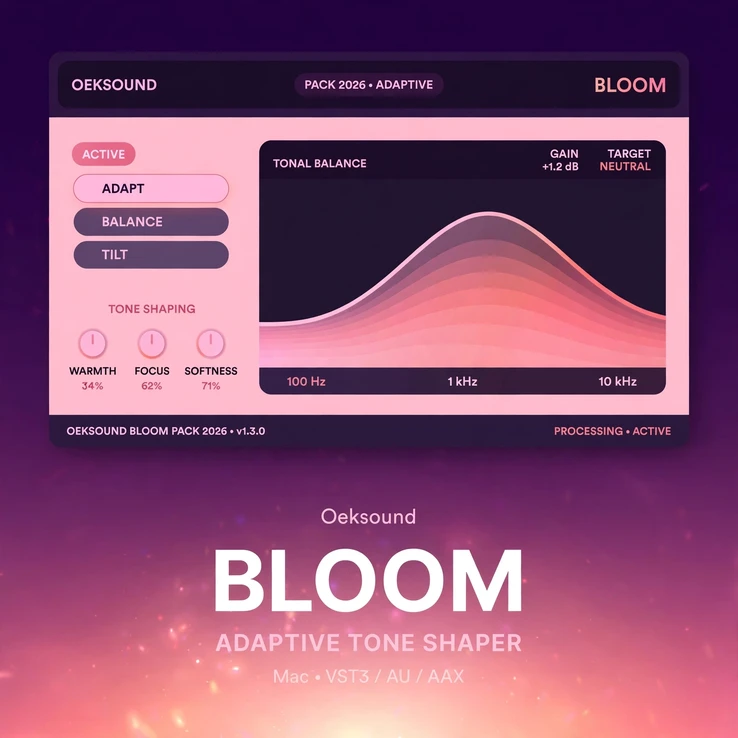
The practical result is speed. Instead of sweeping bands and second-guessing a curve, you choose a direction – warmer, clearer, brighter, tighter – and hear it straight away. The four bands cover the whole picture, from the weight of the lows to the air of the highs, and the display shows you what Bloom is doing across the spectrum. That combination of a simple target and a clear display is what makes oeksound bloom mac quick to learn and quick to trust, even on a first session.
The Amount control and squash mode
The Amount control is the simplest way to decide how far oeksound bloom mac should go. At modest settings it polishes: small irregularities are smoothed out, the tone settles, and the track sounds more finished without sounding processed. Push it further and the shaping becomes more obvious, which is exactly what you want when a sound needs real help or when you are chasing a deliberate effect. The attack and release controls let you tune how quickly Bloom reacts to changes in the signal, so the correction can follow fast transients or sit more gently behind them.
Turn Amount up high enough and Bloom enters squash mode, where it applies frequency-dependent upward and downward compression to reduce the dynamic range of the signal and mould it towards the shape you set. Used subtly, squash brings out detail and consistency; used boldly, it can over-emphasise that detail and add grit without saturation. It is a useful trick on a flat drum loop, a lifeless synth, or a vocal that needs to stay forward in a dense mix, and it is one of the reasons Bloom rewards experimentation.
Low-latency tracking for recording and live work
A tone shaper is most useful when you can hear it while you perform, and oeksound bloom mac includes a low-latency mode for tracking through the plugin. You can shape a vocal or an instrument on the way in, hear the warmth or clarity as you play, and make performance decisions with the finished tone in your ears instead of guessing how it will sound later. That keeps sessions moving, because the sound you monitor is close to the sound you will mix.
In the mix, the same responsiveness keeps large sessions workable. Insert Bloom across several tracks, buses or the mix bus and it keeps up without forcing you to freeze tracks or work around delay. Whether you are recording a demo, tracking a vocalist, or shaping sounds live, oeksound bloom mac stays out of the way and lets the performance come first.
Starting point or finishing touches: tracks, buses and the mix bus
oeksound bloom mac can work as a good starting point when shaping a sound. Drop it on a single track to get a rough recording into shape quickly, then build the rest of the mix around a sound that already sits well. It is useful for quickly crafting single tracks towards a cohesive mix, and it is equally at home as a bus processor, sculpting groups of instruments or sensitively shaping a master. The same four controls and the same listening approach apply at every scale, so you can move from a vocal channel to a drum bus to the mix bus without relearning the tool.
It also makes a strong finishing tool. On a mix bus, a light touch from oeksound bloom mac can even out the tonal balance of the whole song, reveal detail that was hiding behind build-ups, and give the master a more refined, finished feel. On a group bus, it can glue together instruments that were recorded in different places or with different tones. Used sparingly at the end of the chain, it is the kind of processor that makes a mix sound more like itself, only better.
System requirements and compatibility for Mac
This is the Mac-only edition of oeksound bloom mac, built for Apple computers. It runs on macOS 10.14 Mojave through macOS 27 on Intel and Apple Silicon Macs, with Intel support up to macOS 15 Sequoia. The plugin is available in 64-bit VST3, AU and AAX formats, for Pro Tools 2018.1 and later, so it fits into all major Mac DAWs. It needs an Intel Core i5 processor or better, or Apple Silicon, and at least 8 GB of RAM. You can find the full technical details on the official oeksound bloom page.
An iLok account is required for authorisation, and the plugin is authorised through iLok – please have your iLok account and the iLok License Manager installed before you activate. A physical iLok dongle is not required, and one licence allows activation on three machines. Online access is needed for the initial activation. Oeksound also offers a fully featured 20-day trial, so you can try Bloom on your own projects before you commit; check the system requirements against your Mac and your DAW before you buy.
Key features
Here is a quick summary of what oeksound bloom mac offers in a Mac session.
- Adaptive tone shaping that follows the character of your signal in real time
- Four tone controls – lows, low-mids, high-mids and highs – that set the target balance
- Amount control with squash mode for bolder, frequency-dependent compression
- Attack and release controls to tune how Bloom reacts to the signal
- Low-latency mode for tracking, monitoring and live work
- Works on single tracks, groups, buses and the master
- Mac-only edition: macOS 10.14 to macOS 27, Intel Core i5 and Apple Silicon
- VST3, AU and AAX formats for all major Mac DAWs
- iLok activation required; one licence covers three machines
Why mixers choose oeksound bloom mac
Mixers choose oeksound bloom mac because it saves time without sounding like a shortcut. The hardest part of shaping tone is usually deciding what the sound should be, not operating the tool, and Bloom keeps the focus on that decision. You pick a direction, hear it immediately, and move on to the next track, which matters when a session has dozens of channels and a deadline attached. The result is a mix that sounds intentional rather than assembled, with fewer stacked processors and less automation to maintain.
It also sits naturally beside the rest of the Oeksound range. If you already use oeksound soothe3 mac to control resonances, Bloom handles the other half of the job: shaping the overall tone once the harshness is under control. Together they cover much of what a mix needs, and both share the same idea that a processor should listen first and act only when the sound asks it to. Whether the job is a single vocal, a dense rock mix, or a full master, oeksound bloom mac gives you a faster way to a tone you can stand behind.
Frequently asked questions
Is this the Mac-only version?
Yes. This oeksound bloom mac listing is for macOS only, running on macOS 10.14 through macOS 27 on Intel Core i5 and Apple Silicon Macs, with Intel support up to macOS 15 Sequoia.
Do I need an iLok?
Yes, an iLok account is required to activate Bloom. Authorisation is handled through iLok and the iLok License Manager, so set up your account before you activate. A dongle is not required, and one licence covers three machines.
How is Bloom different from an EQ?
A normal EQ applies fixed cuts and boosts. oeksound bloom mac analyses the signal continuously and adjusts its corrections as the sound changes, so it boosts and cuts only when needed. Its four tone controls set the balance Bloom works towards, rather than fixing a curve in place.
What is squash mode?
In oeksound bloom mac, squash mode starts when you turn the Amount control up high. Bloom then applies frequency-dependent upward and downward compression to mould the signal towards your chosen shape, bringing out detail or adding grit without saturation.
Can I use it on a full mix?
Yes. oeksound bloom mac works on single tracks, groups and buses, and on the mix bus for sensitively shaping a master. It also offers a low-latency mode for tracking and live work.



Reviews
There are no reviews yet.